Building a Node-Based Dialogue System in Unity: The Real Implementation
How I built a scalable, visual dialogue system with action integration, ScriptableObjects, and a custom Unity Editor tool.
Building a Node-Based Dialogue System in Unity: The Real Story (With a Few Surprises)
When I sat down to work on a cosy little space game, I’ll be honest, I didn’t have much planned out. No grand story arcs, no massive feature list, not even a proper gameplay loop. The only thing I knew for certain? Characters would be talking. And I thought, “Dialogue can’t be that hard, right? Let’s start there while I figure out the rest.”
Spoiler: it was not that simple. If I just needed a couple of text boxes and some if statements, sure, that would’ve been done before my coffee went cold. But once I imagined conversations branching out, choices leading to different outcomes, or dialogue triggering game events… suddenly this wasn’t “throwaway prototype code.” It was, “guess I’m building a whole editor extension now.”
What started as a casual experiment quickly snowballed into a node-based dialogue system, complete with its own Unity Editor window, ScriptableObject-driven data, and hooks for in-game actions. In short, it turned from “something for my space game” into “a reusable framework I’d actually ship in other projects.”
Results at a Glance
- Scalable: Stress-tested with 1000+ nodes and 1000+ connections, still smooth.
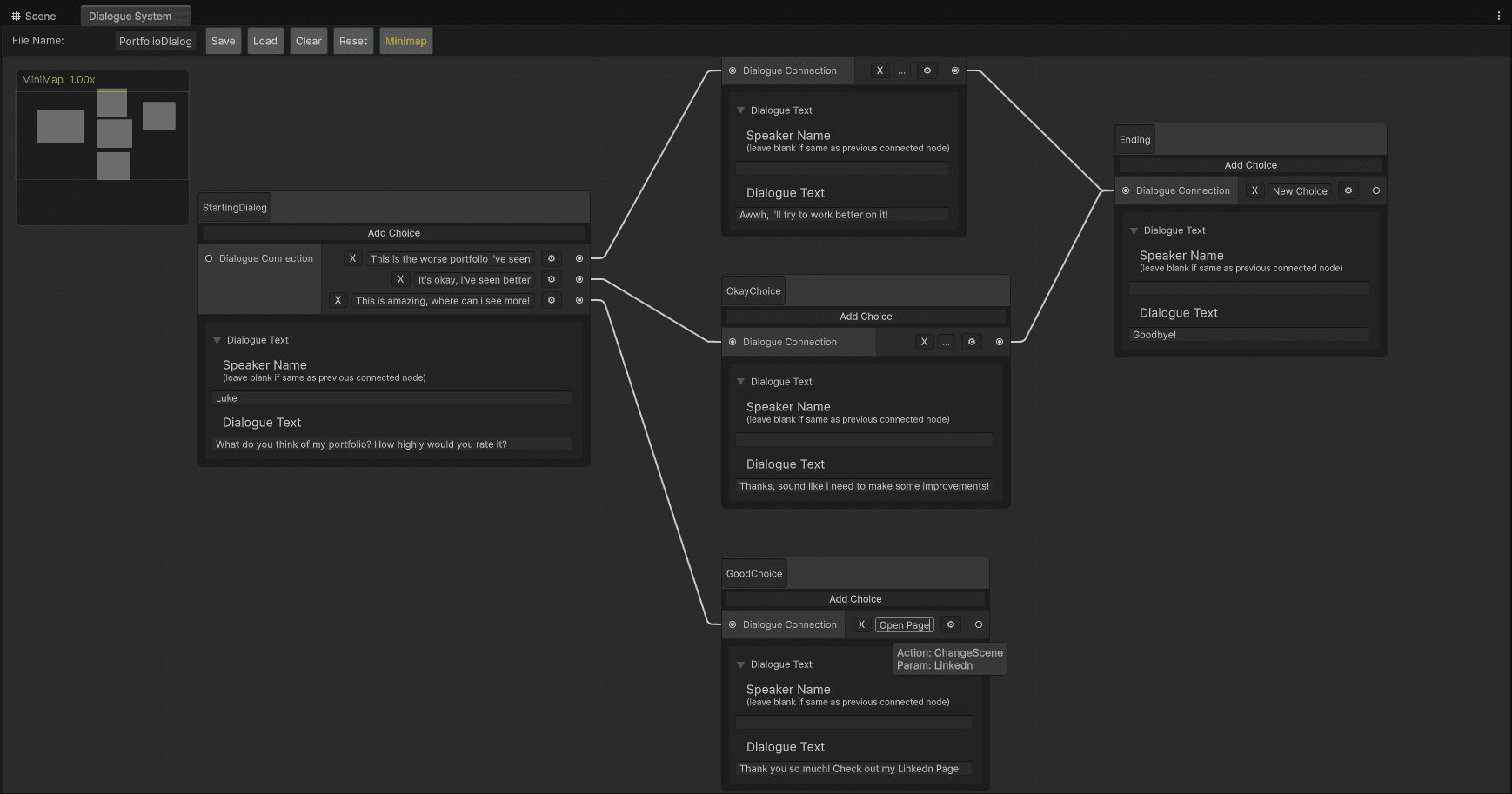
- Visual Workflow: Custom Unity Editor window with graph view, minimap, and drag-and-drop connections.
- Gameplay Hooks: Dialogue choices can trigger in-game events, shops opening, quests starting, scenes switching.
- Reusable: Not tied to one project, built as a general-purpose tool.
- Still Growing: Plenty of features on the wishlist before I’d call it production-ready.
Want a closer look at the project itself? Check out the Dialogue System project page.
Why Build a Custom Dialogue System?
Honestly, I could’ve just bought one. There are plenty of dialogue packages out there. But part of me wanted to see how far I could get making my own. And since I didn’t have a fleshed-out game yet, it seemed like a good place to start.
Pretty quickly, I hit the wall of if statements. They’re fine until you have more than, say, two branches, and then the logic looks like spaghetti on a whiteboard. That’s when I thought, “Wouldn’t a visual system be easier to manage?” Enter GraphView.
GraphView isn’t the most documented part of Unity, but it looked like it could give me what I wanted: a clean, visual way to lay out conversations, drag connections between nodes, and keep dialogue readable at a glance.
So my goals evolved as I went along:
- Figure out how a visual node editor actually works in Unity.
- Make dialogue tie into gameplay actions instead of just text on a screen.
- Structure the data so it felt scalable and maintainable.
- Learn what it takes to make Unity Editor extensions feel like they belong in Unity itself.
ScriptableObjects vs JSON (And Why I Picked the First)
For data storage, I debated between JSON and ScriptableObjects. JSON’s great for huge datasets and easy external editing, but I leaned into ScriptableObjects. Why?
- They’re inspector-friendly, you can actually see and edit dialogue directly in Unity.
- They keep native references intact, no manual ID mapping.
- They play nicely with Unity’s save/load flows.
- Adding new fields later is painless compared to schema migrations.
- And the integration with the rest of Unity is smooth: no parsing errors, no “oops, bad JSON,” just drop it in and go.
So the structure looks like this: a DSDialogueContainerSO holds all the groups, and each node is a DSDialogueSO. That modular setup keeps things reusable and clean.
Here’s a stripped-down version of the two ScriptableObjects at the heart of the system:
// DSDialogueContainerSO.cs
using System.Collections.Generic;
using DialogueSystem.Utilities;
using UnityEngine;

namespace DialogueSystem.ScriptableObjects
{
    public class DSDialogueContainerSO : ScriptableObject
    {
        [field: SerializeField] public string FileName { get; set; }
        [field: SerializeField] public SerializableDictionary<DSDialogueGroupSO, List<DSDialogueSO>> DialogueGroups { get; set; }
        [field: SerializeField] public List<DSDialogueSO> UngroupedDialogues { get; set; }
    }
}
// DSDialogueSO.cs
using System.Collections.Generic;
using DialogueSystem.Data;
using DialogueSystem.Enums;
using UnityEngine;
namespace DialogueSystem.ScriptableObjects
{
public class DSDialogueSO : ScriptableObject
{
[field: SerializeField] public string DialogueName { get; set; }
[field: SerializeField][field: TextArea] public string DialogueSpeaker { get; set; }
[field: SerializeField][field: TextArea] public string Text { get; set; }
[field: SerializeField] public List<DSDialogueChoiceData> Choices { get; set; }
[field: SerializeField] public DSDialogueType DialogueType { get; set; }
[field: SerializeField] public bool IsStartingDialogue { get; set; }
}
}This setup makes it easy to add, move, or reference dialogue data without worrying about IDs or broken links.
Wrestling With GraphView
GraphView is both brilliant and frustrating. Brilliant, because it gave me zooming, panning, and a familiar Unity-style graph interface out of the box. Frustrating, because Unity didn’t exactly flood the internet with docs for it.
I had to solve a few things myself:
- Port Management: Rolling a custom system for creating and connecting ports.
- Serialization: GraphView doesn’t natively save state, so I hacked together my own save/load utility.
- UI Quirks: Like fixed port heights that made me rethink layouts.
Still, despite the quirks, it gave me the flexibility to build something that looked and felt like a proper Unity tool, not a random add-on bolted to the side.
Making Dialogue Actually Do Something
From the beginning, I didn’t just want dialogue to be text bubbles. I wanted it to actually matter. If a player chooses “Yes,” maybe they get an item. If they say “No,” maybe the shop closes.
So I added an action system. There are two main types:
- Post-choice actions (e.g. open a shop after selecting “Buy”).
- Pre-choice triggers (e.g. a quest that has to be completed before the choice shows up).
I kept the system simple: enums for different action types (OpenShop, GiveItem, TriggerEvent, etc.), and a handler that checks what’s selected and runs the logic. Down the line, I want to make the handler abstract so different games can plug in their own logic.
The tricky bit was Unity’s UI, fitting all this into GraphView’s choice node without it looking like a UI crime scene. The solution was a popup action menu. Not glamorous, but it works.
Runtime: Where the Magic Actually Happens
The DialogueManager is what makes it all playable. It pulls the text and speaker names, generates choices on the fly, and makes sure everything reacts as expected. Because it’s ScriptableObject-driven, designers can tweak dialogue without touching runtime code.
In practice, this meant I could change conversations mid-development, hit play, and see the updates instantly. No rebuilding, no re-parsing, just edit and go.
Stress Testing and Extending
I didn’t want to build something that worked for 10 nodes and then collapsed at 100. So I scaled it up gradually, 10, 50, 100, 300, and eventually 1000+ nodes with just as many connections.
Performance stayed surprisingly stable. Zooming and panning still worked fine, and interacting with the graph didn’t slow down. I even built a debug window that spits out metrics like node counts and connections, just to keep tabs on it.
And because of the modular ScriptableObject design, extending the system felt straightforward. Want a new action type? Add it to the enum, write the handler, done.
Future plans include:
- Collapsible groups for keeping the graph tidy.
- Localisation support.
- Conditional dialogue based on player state.
- Analytics on choice patterns.
- And eventually, voice integration.
Case Study: Tower Defence RPG
While this dialogue system was born out of a space game idea, I ended up testing it in a tower defence RPG I was building on the side. It was meant to be small, but like these things often do, it grew. The RPG needed conversations, quest dialogue, and even shops triggered by dialogue choices.
This proved the system could handle branching quests, player progression, and gameplay-relevant dialogue, not just cosmetic interactions. It showed me that the framework wasn’t just theory. It worked in practice.
What I Learned Along the Way
- Editor tools: If you want them to feel native, you have to embrace Unity’s quirks.
- Data structures: ScriptableObjects are powerful, but you need to manage references carefully.
- UX: Testing with non-devs (in my case, my fiancée) exposed where the workflow wasn’t intuitive.
- Time investment: Next time, I might just buy a package… but I’d miss out on the fun (and frustration) of building it myself.
Wrapping Up
What started as “let’s get some dialogue in this game” turned into a robust, reusable system that I’d happily use across projects.
For designers and writers, it’s a visual, intuitive way to build branching conversations. For developers, it’s type-safe, extensible, and performant. For me, it was a crash course in making tools that don’t just work, they feel good to use.
If you’d like to see a quick overview and demo highlights, check out the Dialogue System project page.
Have you built your own dialogue tools in Unity? I’d love to hear how you tackled it, what worked, what didn’t, and what you’d do differently.
And if you’re looking for someone who can design Unity tools that scale, let’s talk.